Smart Matching for open account transactions
In Open Account Automation, data is digitally exchanged between buyers and suppliers. It is matched against contract terms and discrepancies are resolved based on rules and trained patterns.
As a Senior Product Designer, I led the design of Smart Matching, digitizing a manual invoice and PO matching process on a blockchain-based platform. I partnered with a UX researcher on discovery and testing, and worked closely with the product owner, business analysts, and head of product through three design iterations.
What I worked on
Owned end-to-end design of MPN's invoice-PO matching experience: research, three iterations, user testing, and desktop and supplier app designs.
Results
Streamlined the process by 70%
Vastly improved communication between buyers and suppliers
Intuitive experience for desktop and mobile devices
Timeline
April 2022 - June 2022 | 3 months

Why smart matching?
The Open Account business model involves a Buyer Approving Invoices that they will pay at maturity. An Invoice is Approved when it satisfies a set of rules specified by the Buyer or when an Invoice does not satisfy the rules, the Buyer accepts the Invoice. And there the business starts for Marco Polo Network.
The platform had matching functionality, but it was combined with the ledger flow. Although it wasn't the most crucial feature for other business modules, it was the most important one for Open Account. Our project goal was to create a data-driven intuitive experience for OA customers.
Problem framing
A full day workshop with the product team
We started with an extensive full-day workshop, dedicated to analyzing and reviewing the existing matching feature. The workshop served as a platform for identifying actionable items and gaining valuable insights.

Meeting with stakeholders in the workshop
We divided the session into three parts as follows:
Support ticket review & analysis
42% of tickets were about users struggling to find unmatched data. 26% of users were unsure about how to resolve the issues.
Feedback from demo sessions
BOA would prefer to resolve the issues from the document view. SMBC would prefer to have matching data separately.
How this helps MPN to do business
Robert Myers – the Product Owner presented the matching feature for the Open Account module.
Heuristic evaluation
As we already had something on the platform, we wanted to conduct a heuristic evaluation so that we can find some obvious errors. We invited 2 Senior Product Designers from other verticals to participate in the session. Some highlights of the session are as follows:
4/4 of the participants preferred document views that resembled paper-based documents.
3/4 of them preferred fields to be represented by their names rather than the system-defined path.
3/4 participants wanted the details of linked documents to be presented separately.
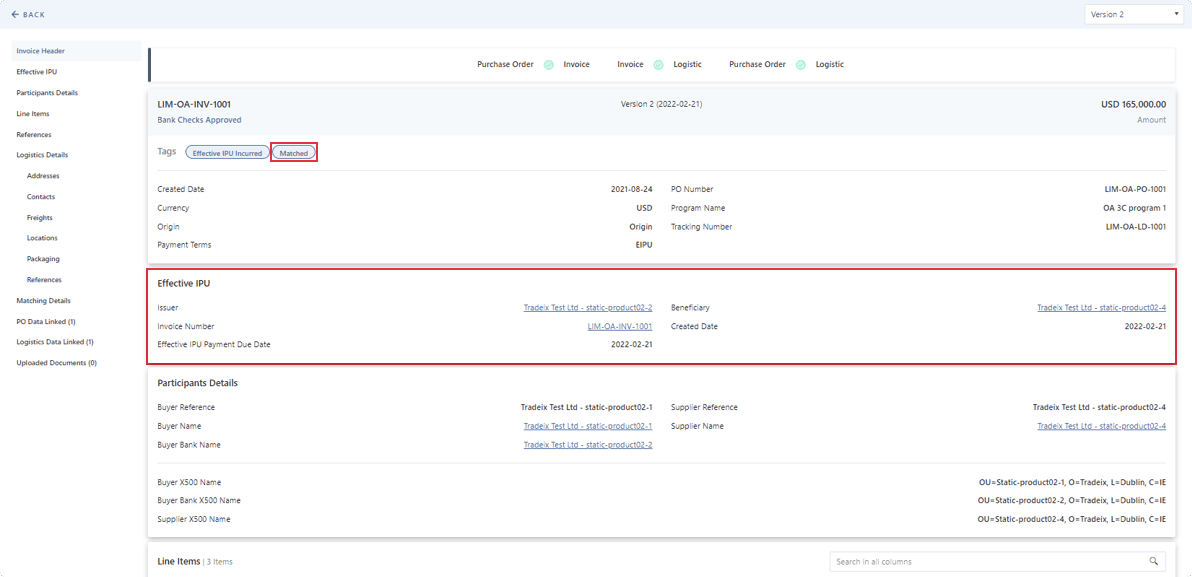
Old platform – status in tag

Old platform – matching details
Survey
We surveyed over 20 individuals from SMBC, BOA, and BNPP to know about their experience with the existing implementation. With the insights we got, we created some action items that:
Redesign the ledger details pattern, that is more aligned with real-world paper-based documents.
Simplify the matching pattern that gives the overview and ability to dig down further if a user wants to.
Design the resolve issues flow when any discrepancy happened.
Key findings after research
A lot of details, but no overview
No overview of matching events but a details view with all the attestations that happened against the matching rules during the process.
Visibility of matching status
Matching states combinations were not sorted out and displayed in the tag. That creates confusion and remains unnoticed by most of the users.
No way to resolve the issues
The only way was to upload the invoice/PO again and the system will run the matching process again but there wasn’t enough instruction about that.
Change in the business context
In the Open Account business model, it is most important to let buyers and suppliers know if their Invoices and POs are not matched.
Designing for users’ mental models
After doing the workshop and a couple of brainstorming sessions, we jumped into the ideation process. I developed some ideas based on action items and had refinement sessions with the team.
Iteration 1
After spending some time sketching rough ideas in my notebook, I started creating concepts using our schematic design system. Also, using relevant content where it’s needed to explain the concepts. For this concept I restructured as follows:
Showing document details in a paper-based document structure.
Introduced horizontal navigation instead of the vertical one.
For matching details, show only a top-level matching overview with an option to expand and see further details.

PO details – concept 1

Matching details – concept 1
Feedback on concepts
From the refinement session with the product owner, business analysts, and head of product, we found some important feedback as follows.
Some important data points went missing.
Showing matching details per field is conflicting with the rule configuration pattern in a program.
Iteration 2
Incorporated multiple statuses to be visible in the document
Added option to see all fields for line items
Added quick navigation for each data set
Displayed the matching details per the matching rule so that the implication of tolerance can be reflected to customers.

PO details – concept 2

Matching details – concept 2
Feedback on iteration-2 concepts
A summary of overall matching can be helpful
Matching details can focus on matching value rather than the rules itself
Discrepant data should be displayed at the top as we can save users time in finding them
Iteration 3
Started putting the concepts in the product mainline design framework.
Created the Hi-Fi prototype for PO Ledger & Matching flow using the design system.
Proceed with only matching status to know what else they expect to see.
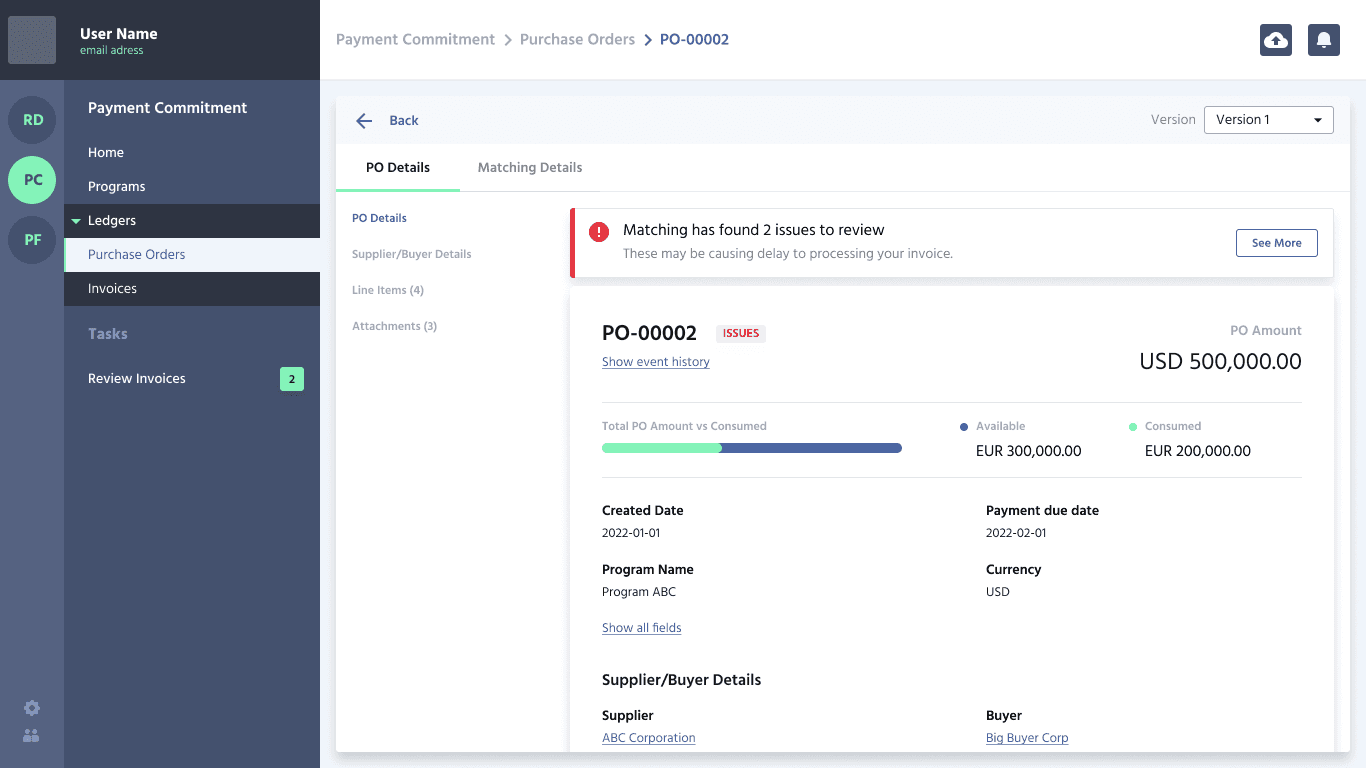
PO details – concept 3

Matching details – concept 3
Testing the concept with users
We wanted to know about the mental model of our users, how they think about matching, what they expect, and what is more important to them. We wanted to give our participants an impression of a real product. Some of our participants already used our platform earlier and some of them were new. We used lookback as a user-testing platform. We recruited some of the participants through usertesting.com.
Number of participants
8
Total session time
284 minutes
Total session highlights
168
My role
Observer and synthesis lead

User testing session – lookback
Key highlights
The main insight we gained from the user testing session is that users are not concerned with the details when everything matches. However, if there are discrepancies, users expect to be informed about the issue first and then be able to fix it.
6/8 participants wanted to see document status and matching status both to be displayed.
5/8 participants wanted to individually resolve issues from document details. They also appreciated having a common space for resolving issues.
4/8 participants were confused with the status ‘Issues’ and considered it as upload invoice issues.
4/8 participants wanted to see the compared values highlighted rather than the configured rule.
3/8 participants stated that matching details should have line item references.
3/8 participants tried to access the document that matched with.
The solution
Based on the insights gathered from the user testing session, and with all the feedback we gathered from initial concepts, we finally found the opportunity to improve the solution. We approached redesigning using the new design system as follows.
At first, we updated the user flow.
Recreated the previous concepts using the components from the new design library.
Started putting the screens in the latest design.
Applied the insights we got from the user testing sessions.
Updated flow

Revised user flow
Status combination
Document status now stays with the document ID as always. We are only showing matching status if any items are found discrepant. Also, we updated the status for not matched items.
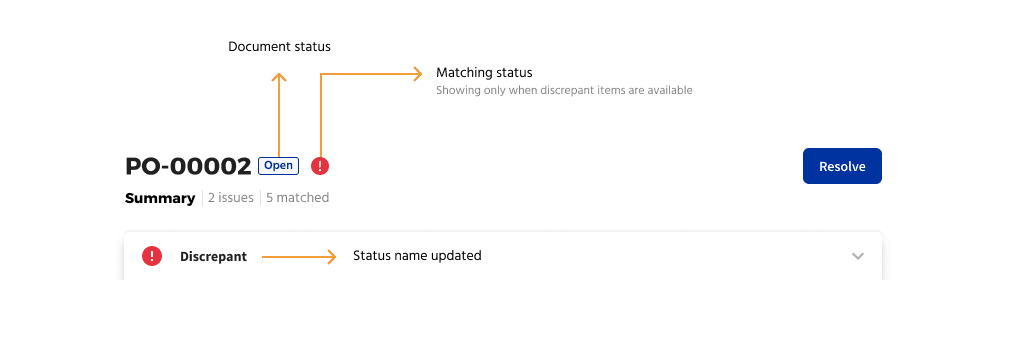
Document status and matching status view
Matching result (Discrepant)
Compared values are now shown at the top with a clear document reference. Also, the configured rule is available below the comparison.

Matching comparison side by side
Resolving issues
If any of the configured matching rules are NOT satisfied the purchase order is discrepant. The Buyer can accept or reject a discrepant purchase order.

PO adjustments

Add adjustments
Final designs
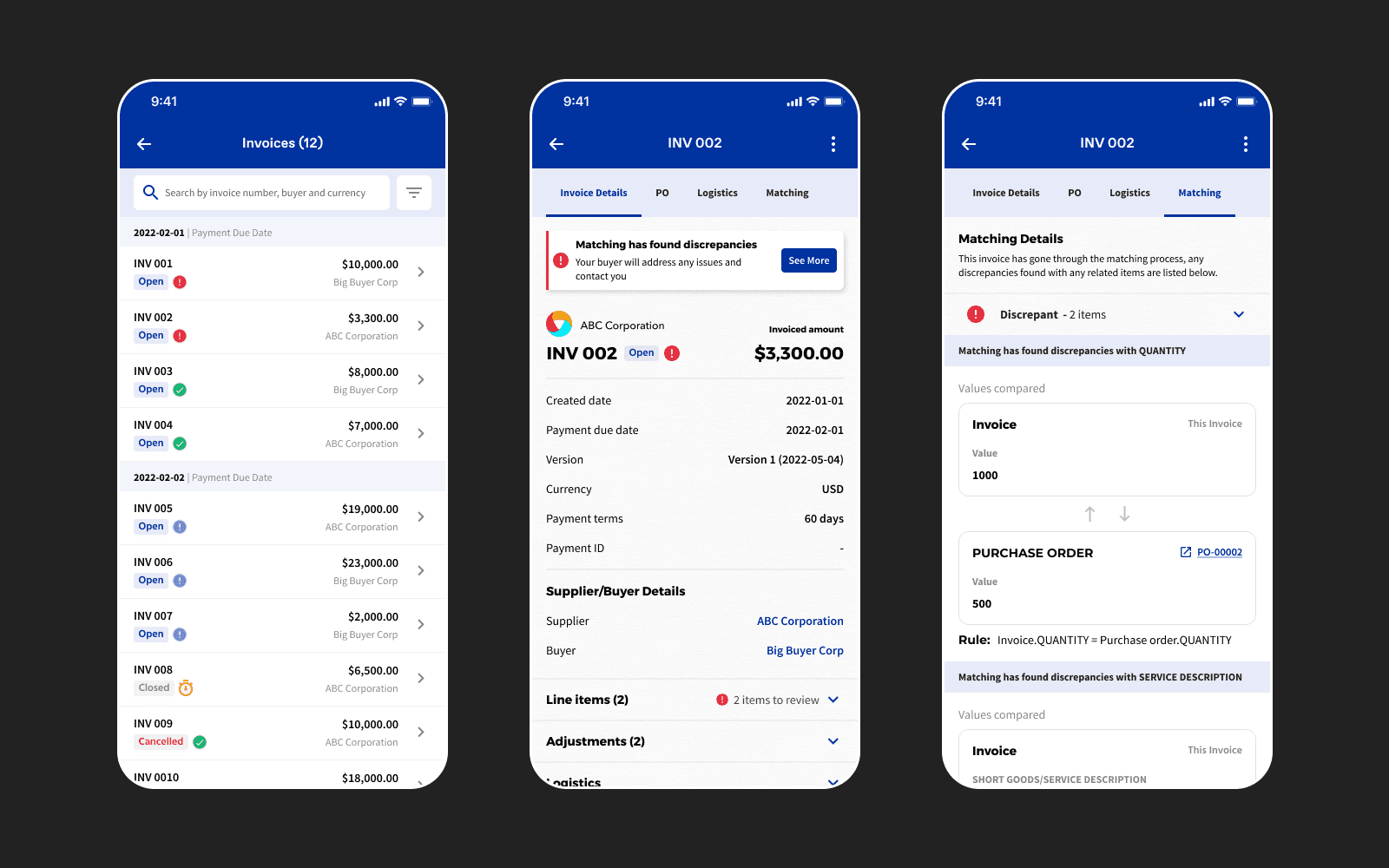
Designing for SP App
Once we have finalized the desktop workflow and designs, we started designing for SP apps. The targeted users are Suppliers who upload invoices and will check matching updates from the app. The app is not offering all the opportunity to complete the whole journey of invoice processing but will be able to communicate using the app. Here are the designs we offered for the App.
Learnings
Keep edge cases away when you start
When prioritizing, we discovered many less common cases were seen as significant in the previous flow, making it overly complex. By pinpointing the crucial aspect of the matching flow, we simplified the experience and validated it with users.
Design systematically
Learning systematic design was crucial for my project growth. It's vital to know when to detail designs. With a defined system, maximize its use. We began with schematics for initial team feedback, then transitioned to high-fidelity components.
Engaging stakeholders matters
This project engaged both industry experts and non-business individuals. While tech experts like us may lack insight into physical-world business operations, input from experts was crucial. Additionally, user feedback from diverse groups was transformative, guiding design solutions to address business challenges efficiently.
Always keep feasibility in mind
Ensure your solution is both unique and achievable within the development architecture. Address challenges in Tech-refinement sessions, adapting your approach to meet customer expectations and platform constraints while showcasing customer benefits.
Shout-outs
A huge thanks to everyone involved in the process from the kick-off to delivery. Special thanks to Martin Parker for giving me the opportunity. Big thanks to Sarah Herbert for partnering with research activities.
